
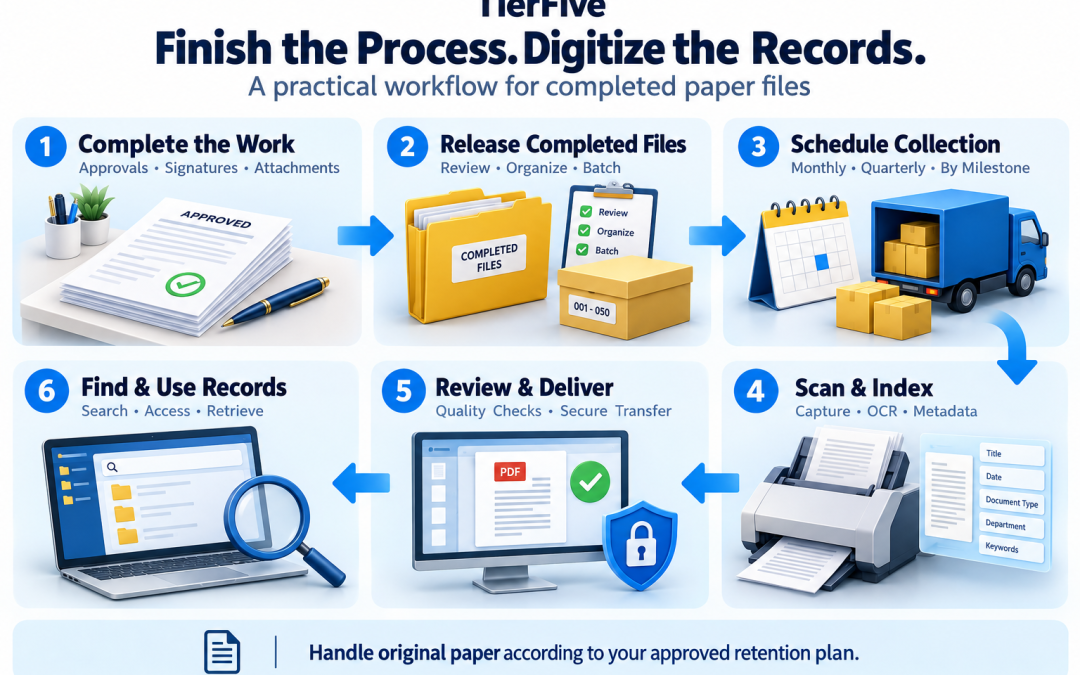
Digitizing Paper Records After Business Processes Are Completed
Finish the work. Capture the completed record. Keep the next stack from becoming another archive.
Paper may still play a practical role while employees collect signatures, record observations, reconcile transactions, or assemble supporting documents. But once that activity is complete, the file can often move into an organized digital records workflow. This approach is called post-process scanning: digitizing a record after a defined business milestone rather than automatically scanning every page as it arrives. TierFive can help plan scheduled document scanning around completed files, with preparation, OCR, indexing, quality review, and digital delivery included according to the agreed scope.
Plan a Scheduled Document Scanning Workflow Call (888) 547-2267 for a free consultation.
What Is Post-Process Document Scanning?
Post-process document scanning converts paper records into digital files after the associated transaction, approval, project stage, or other defined activity is complete. For example, an invoice packet might be released for scanning after approval and reconciliation. A shipping packet might be released after delivery documentation has been received. The important decision is what makes that collection ready for capture. Scanning readiness is a defined milestone. It does not automatically mean the record can be destroyed, that no further documents will arrive, or that every version should be discarded. Establish those decisions separately.
Why Scan After the Active Paper Workflow?
Timing matters. The best capture point depends on when information becomes available, who needs access, and how often the record changes.
Capture the assembled record rather than an incomplete packet
A document scanned on arrival may later acquire approvals, supporting pages, handwritten entries, or signatures. If the archive must contain the completed packet, those additions need to be captured and associated correctly.
Scanning after a defined completion milestone can reduce repeated handling and make document separation easier to specify. It still requires a process for late additions and corrections.
Planning question: Who confirms that the packet is complete, and what checklist will they use before releasing it?
Keep active documents available while employees finish the work
Removing originals for scanning during a busy operational stage may interrupt work if employees still need to annotate, assemble, or reference them.
A planned handoff lets the department retain active files and release completed batches at an agreed time. This is especially useful when scanning is performed away from the working location.
Planning question: Which records can leave the department, and how will urgent access be handled during processing?
Create a repeatable handoff instead of an occasional cleanup
Without an established release process, finished paperwork can remain on desks or accumulate in cabinets. A recurring scanning schedule gives completed records a defined next step.
Assign ownership for identifying ready files, preparing a batch list, and arranging collection. Measure the waiting time between completion and digital availability.
Planning question: Who owns the handoff, and how long should completed records wait before scanning?
Use immediate scanning when earlier digital access is necessary
Some workflows need digital access at receipt for routing, collaboration, or time-sensitive review. In those cases, waiting until completion may create an unnecessary delay.
A hybrid approach can capture incoming material early and capture the completed packet later. Define how versions and additions will be distinguished so users know which file they are viewing.
Planning question: Do users need the incoming document, the completed record, or both?
Keep Active Paper Organized Before Scanning
Post-process scanning works best when paper remains controlled during its active life. Temporary staging should have clear ownership, access rules, and a time limit.
Separate active files from completed files
Use clearly identified locations or containers for active work and records ready for scanning. Avoid mixing unfinished packets with approved batches.
A department can use status labels or a batch register to show whether a file is active, awaiting review, ready for collection, or already transferred.
Practical step: Establish a release status that employees can apply consistently.
Replace informal “floor filing” with controlled staging
Convenient access should not mean leaving confidential records in public areas, loose piles, or locations exposed to damage. Choose a staging arrangement suited to the sensitivity and volume of the collection.
Keep containers identifiable, restrict access where appropriate, and assign responsibility for the records. A temporary location should not quietly become permanent storage.
Practical step: Set a maximum staging period and a review date for batches that have not moved forward.
Document the release and transfer
Prepare a batch list identifying the containers, department, record range, and relevant handling instructions. Reconcile the collection at handoff.
Keep enough information to identify where originals are while they are being processed. Define who can request an urgent record and how that request will be communicated.
Practical step: Use a consistent batch identifier from release through delivery and acceptance.
Examples of Records That Can Be Scanned After Completion
These examples illustrate possible release milestones. Your organization should define the appropriate milestone for each record collection.
Accounts payable and completed invoice packets
Possible milestone: Required approvals, coding, and reconciliation have been completed and supporting documents have been assembled.
Potential index fields: Vendor identifier, invoice number, invoice date, purchase order, and document category.
Decision to make: Determine whether the invoice and its supporting paperwork become one PDF or separate associated records. Establish a process for later adjustments.
Shipping, logistics, and delivery records
Possible milestone: The shipment has reached its defined completion point and the required delivery documents are available.
Potential index fields: Shipment reference, bill of lading number, carrier, delivery date, and document type.
Decision to make: Identify how missing confirmations or later claims will be tracked without holding every completed packet indefinitely.
Manufacturing work orders and production records
Possible milestone: The work order or production stage has been closed and the required reviews and attachments are complete.
Potential index fields: Work order, part number, batch or lot, revision, facility, and record type.
Decision to make: Preserve relationships between production paperwork and supporting inspection or material records. Confirm which revision the packet represents.
Completed projects, contracts, and case files
Possible milestone: The responsible team has approved the file for archival capture after a defined closeout or review.
Potential index fields: Project or matter number, client identifier, document type, relevant date, and volume reference.
Decision to make: Specify file order, treatment of drafts, and how additions will be associated with the archived collection. Identify originals requiring continued physical retention.
Government permits and administrative records
Possible milestone: A department has completed the applicable review or closure stage and authorized the packet for scanning.
Potential index fields: Permit or case number, department, parcel identifier, record series, and document date.
Decision to make: Coordinate oversized attachments, access restrictions, and the destination system’s metadata structure.
Explore more document scanning and indexing examples by industry.
How a Scheduled Scanning Workflow Can Work
- Define readiness: Establish the milestone, checklist, and person authorized to release each collection.
- Assemble completed batches: Separate ready files from active work and prepare a batch list.
- Arrange collection: Agree on pickup or delivery, custody documentation, and access requirements during processing.
- Prepare and capture records: Process the paper according to the agreed document boundaries and capture requirements.
- Add search and organization: Apply OCR, indexing, file names, and folder structures within the project scope.
- Review and deliver: Complete the agreed quality checks and provide files and metadata using the planned delivery method.
- Accept the output and resolve originals: Review deliverables before authorizing the next step for physical records.
TierFive can help define the scanning portion of this workflow. Review our document scanning process for more detail.
Choose a Scanning Schedule That Matches Your Work
Collection frequency should reflect how much completed paper you generate, how quickly users need digital access, and how much controlled staging space you have.
Monthly scanning for a steady flow of completed records
A monthly schedule may suit departments producing regular batches that should become digitally available throughout the year.
Track batch volume and the delay between process completion and digital access. Adjust the schedule if staging fills up or users need records sooner.
Discuss with TierFive: Expected volume, location, preparation, turnaround requirements, and collection arrangements.
Quarterly scanning for moderate-volume collections
A quarterly schedule may be appropriate when records accumulate more slowly and can remain in controlled staging until collection.
Confirm that the interval will not interfere with retrieval needs. Assign responsibility for maintaining the batch register between pickups.
Discuss with TierFive: Batch size, interim access, collection timing, and delivery expectations.
Annual or milestone-based scanning for selected archives
An annual or milestone-based project may fit lower-volume collections or records released at a project closeout. It should not be selected automatically for files employees need frequently.
Allow for the accumulated volume and review any collections that remain staged longer than expected.
Discuss with TierFive: The release date, estimated volume, deadline, and priority records. Confirm availability and project-specific arrangements.
Why Scan Before Adding Records to Long-Term Paper Storage?
Reduce the growth of cabinets and boxed archives
Scanning completed records gives you an opportunity to reduce future physical storage where originals do not need to remain. It can also make retained paper less central to everyday retrieval.
Measure actual cabinets, boxes, and floor space affected. Storage savings depend on approved disposition and the costs you can genuinely discontinue.
Limit recurring retrieval and handling expenses
Sending every completed batch directly to box storage may create continuing retrieval, delivery, and refiling charges. Staff time spent requesting and handling paper adds another cost.
Compare those expenses with scanning, indexing, digital hosting, and any continued storage of originals. Include withdrawal charges when evaluating an existing archive.
Make completed records easier to locate
Consistent naming and index fields can give employees a defined retrieval method instead of relying on cabinet locations or a colleague’s memory.
Choose fields based on real searches. Test representative tasks before and after conversion to assess the improvement.
Support digital access and recovery planning
Digitized records can be delivered to a repository that supports authorized access and backup procedures. This can reduce dependence on a single physical collection.
Digital files still require protected storage, access management, and tested recovery. Define who is responsible for those ongoing functions.
Handle Exceptions Without Losing Control of the Archive
A document arrives after the batch has been scanned
Define how late additions are identified and associated with the existing digital record. Decide whether the new material becomes an attachment, a separate linked file, or part of a revised packet.
Keep the naming and indexing consistent so the addition does not become an isolated file.
A completed record needs correction or reopening
Establish a version-handling procedure before scanning begins. Users should be able to distinguish the previously captured record from subsequent material.
Clarify who authorizes updates and how your destination system will record the change.
Staff need an original while it is being processed
Agree on an urgent retrieval procedure, authorized contacts, and communication expectations before collection.
Identify high-priority records during scoping. Do not assume every original will be immediately accessible once a batch enters production.
Frequently Asked Questions About Post-Process Scanning
Should every document wait until a process is complete?
No. Scan earlier when routing, collaboration, or timely digital access requires it. Post-process scanning is useful when a defined completion milestone provides the appropriate capture point for an assembled record.
Can completed files become searchable PDFs?
Searchable PDF output can be included through OCR. Recognition depends on the original text and image quality. Structured indexing can provide an additional retrieval method for identifiers, dates, and document categories.
Can scheduled scanning work alongside an existing backlog?
Yes. Plan the historical backfile conversion separately from the ongoing flow of completed records. Establishing a recurring handoff can help prevent new paperwork from replenishing the backlog while older collections are addressed.
Does scanning mean the originals can be destroyed?
No. Process completion, digital acceptance, and paper disposition are separate decisions. Your organization should identify which originals must remain and authorize any destruction after the agreed review steps.
What affects the cost of scheduled document scanning?
Volume, collection arrangements, preparation, document condition, indexing, quality checks, and delivery affect the scope. TierFive quotes accurately for the agreed work. Confirm included services and any requested additions before proceeding.
What information should we bring to the first consultation?
Describe the process, the point at which records are complete, expected batch volume, document condition, search fields, destination system, and access requirements. An approximate box or folder count is enough to begin the conversation.
Give Completed Paper Records a Better Next Step
You do not need to replace every active paper process to improve the archive that follows it. Start with one department, define when its files are ready, and establish a repeatable handoff for scanning.
TierFive can help scope collection, preparation, capture, OCR, indexing, quality review, and delivery around your completed records—with an accurate quote for the agreed work.
Request a Free Scheduled Scanning Consultation Call (888) 547-2267