
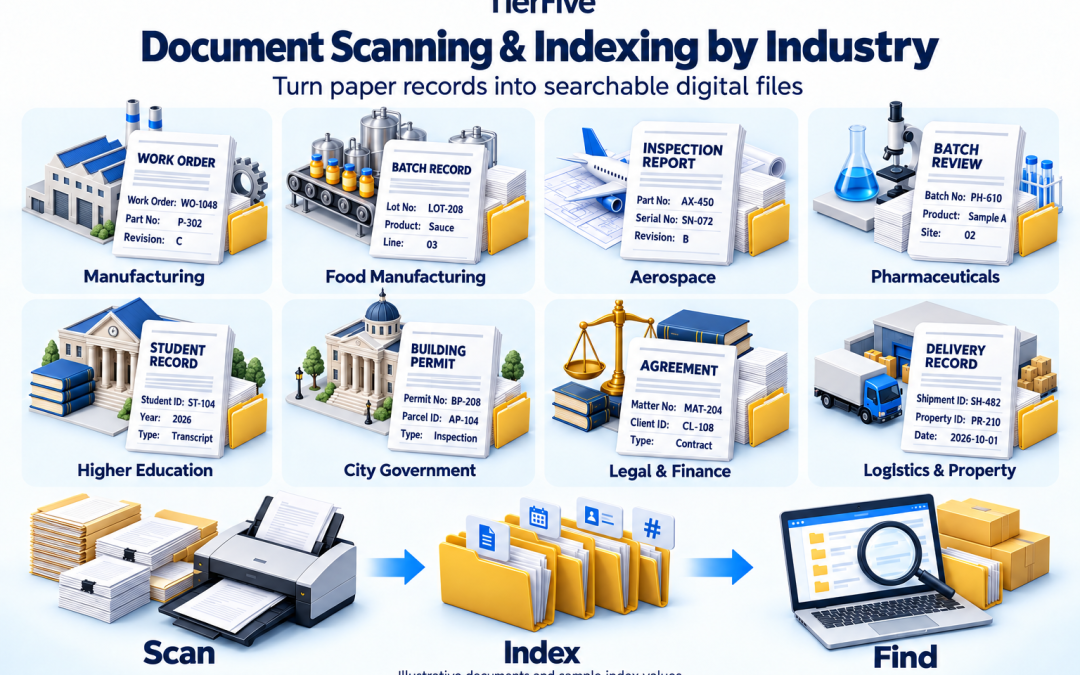
What Documents types do businesses scan?
Scanning turns paper into digital images. The right indexing helps your team find the record it needs. A manufacturer may search by work order, a property manager by building and unit, and a university by student identifier. Your digital archive should reflect those differences. TierFive provides document scanning and digital conversion for businesses and organizations. This guide connects industry document examples with suggested indexing fields so you can plan an archive around everyday retrieval. Whether you are converting boxed records, departmental files, or a legacy paper archive, start by identifying what employees need to find—and which information reliably identifies each record.
Discuss Your Document Scanning and Indexing Project Call (888) 547-2267 for a free consultation.
What Is Document Indexing?
Document indexing associates a digital file with selected information, such as a reference number, date, document type, or location. These values are often called metadata or index fields. For example, a scanned invoice could be indexed by vendor, invoice number, and invoice date. Staff could then locate it using those fields rather than opening every PDF in a folder.
OCR and indexing serve different purposes. Optical character recognition adds recognized text for searching within supported files. Indexing provides structured information for identifying and organizing records. A project may use either or both.
About the examples: The fields below are planning suggestions, not mandatory templates. Sample identifiers are fictional. Final fields, validation rules, and search capabilities depend on your project scope and destination system.
Explore Document Scanning and Indexing by Industry
Expand your industry to see representative records, suggested fields, and decisions to make before scanning.
Manufacturing and Industrial Records Scanning
Record examples: Engineering change orders, bills of materials, production schedules, work orders, inspection reports, material certifications, equipment maintenance logs, purchase orders, and supplier records.
Suggested index fields: Part number, work order, production batch, revision, facility, supplier identifier, document type, and record date.
Retrieval example: A quality team searches a work order and part number to locate production and inspection records, then checks the applicable revision.
Plan before scanning: Distinguish product revisions and preserve links between work orders, inspections, and supporting material records. Identify mixed paper sizes, handwritten shop-floor entries, and oversized engineering drawings. Define how missing or conflicting identifiers will be reviewed.
TierFive’s approach: Plan preparation, image capture, OCR, indexing, and quality checks around the agreed retrieval needs. Coordinate oversized documents and metadata so related files remain organized for delivery or system import.
Food Manufacturing and Processing Records Scanning
Record examples: Production batch sheets, ingredient receiving records, supplier certificates, sanitation logs, temperature records, packaging checks, quality inspections, and shipment documentation.
Suggested index fields: Product code, production lot, ingredient lot, facility, production line, document type, record date, and shipment reference.
Retrieval example: An authorized quality employee searches a finished-product lot to locate its production paperwork and associated ingredient or shipment references, where those relationships have been captured.
Plan before scanning: Define how ingredient, production, and shipment identifiers will be associated. Review handwritten logs, stained pages, and faint printing before choosing capture settings. Confirm date formats, exception handling, and the organization’s retention and access requirements.
TierFive’s approach: Scope document preparation, scanning, indexing, quality review, and delivery around your record structure. Organized digital files can support retrieval, but scanning does not create missing traceability information or replace your food-safety management procedures.
Aerospace and Aviation Document Scanning
Record examples: Engineering drawings, manufacturing travelers, inspection reports, material certifications, maintenance records, supplier documentation, and configuration-change records.
Suggested index fields: Part number, serial number, assembly reference, revision, supplier identifier, document type, inspection date, and work order.
Retrieval example: Authorized staff search a component serial number and document type to locate its associated inspection or material records.
Plan before scanning: Preserve relationships between components, assemblies, revisions, and supporting documents. Identify oversized drawings, faint annotations, and any restrictions on technical information. Confirm vendor eligibility, personnel access, processing locations, and transfer arrangements before restricted material is shared.
TierFive’s approach: Define capture, indexing, quality-control, and delivery requirements during project scoping. Identify special handling or access restrictions early so suitability can be evaluated before records are accepted.
Pharmaceutical and Life Sciences Document Scanning
Record examples: Batch records, laboratory worksheets, analytical reports, equipment logs, validation documentation, supplier qualifications, training records, and controlled procedures.
Suggested index fields: Product identifier, batch or lot number, document number, revision, site, record type, effective date, and equipment reference.
Retrieval example: Authorized quality personnel search a batch number to locate the associated production documentation and supporting reports.
Plan before scanning: Define document completeness, page sequence, revision handling, and relationships between records. Identify handwritten entries, signatures, and attachments that require careful capture. Have your quality team specify applicable acceptance, validation, retention, and electronic-system requirements.
TierFive’s approach: Scope capture, indexing, review, and delivery against the requirements supplied by your organization. Define acceptance procedures before production; scanning alone does not establish a validated electronic records system.
Higher Education and University Records Scanning
Record examples: Admissions files, student transcripts, financial aid paperwork, academic department records, faculty personnel files, accreditation materials, research administration records, and campus facilities documents.
Suggested index fields: Student or employee identifier, department, academic year, document category, record date, and grant or project reference where applicable.
Retrieval example: An authorized administrator searches a student identifier and document category to locate a transcript without reviewing unrelated financial aid or personnel records.
Plan before scanning: Separate collections with different access requirements. Define how attachments, historical identifiers, and records spanning multiple academic years will be organized. Identify the institution’s privacy, retention, and system-import requirements.
TierFive’s approach: Scope preparation, scanning, OCR, indexing, quality review, and delivery around the institution’s stated requirements. Coordinate file structures and metadata with the team responsible for the destination repository.
City Government and Municipal Records Scanning
Record examples: Council minutes, resolutions, ordinances, building permits, planning files, public works records, contracts, financial documents, and departmental archives.
Suggested index fields: Department, record series, permit or case number, parcel identifier, address, document type, meeting date, and project reference.
Retrieval example: A city employee searches a permit number or parcel identifier to locate the related application, inspection paperwork, and plan set.
Plan before scanning: Distinguish internal access from public access. Identify records requiring restricted handling or redaction, and clarify how related plans and attachments will remain associated. Coordinate metadata with the municipality’s retention structure and destination system.
TierFive’s approach: Plan document preparation, scanning, indexing, quality review, and digital delivery around the agency’s requirements. Define custody tracking, exception handling, and system-import specifications in the agreed scope.
Retail Document Scanning
Record examples: Sales invoices, return authorizations, receipts, inventory reports, and price adjustments.
Suggested index fields: Transaction number, store identifier, document type, transaction date, and product reference where needed.
Retrieval example: Staff locate paperwork for a particular transaction at a specific store without searching unrelated locations.
Plan before scanning: Decide whether supporting receipts and return forms belong in one transaction file or separate linked records. Capture only the customer information needed for the intended lookup.
Transportation and Logistics Records
Record examples: Bills of lading, delivery notes, freight invoices, manifests, and maintenance records.
Suggested index fields: Shipment reference, carrier, shipping date, document type, vehicle identifier, or delivery reference.
Retrieval example: An employee searches shipment reference SH-10482 to locate the corresponding delivery paperwork.
Plan before scanning: Identify which number consistently links shipment documents. Preserve important handwritten annotations in the image even when they are unsuitable for reliable OCR.
Technology and Software Business Records
Record examples: Service agreements, development contracts, bug reports, manuals, and project plans.
Suggested index fields: Client identifier, project number, product, version, document type, and effective date.
Retrieval example: A project manager locates the agreement associated with a client and a defined software release.
Plan before scanning: Distinguish executed agreements from drafts and identify how versions will be recorded. Documents already available digitally may require organization or migration rather than paper scanning.
Hospitality and Tourism Records
Record examples: Reservations, event contracts, room checklists, guest feedback, and invoices.
Suggested index fields: Property identifier, booking reference, event date, document type, and relevant department.
Retrieval example: An events coordinator finds the signed paperwork for a booking using its reference number.
Plan before scanning: Separate booking records from property maintenance collections. Define access restrictions for files containing guest or payment information.
Legal Document and Case File Scanning
Record examples: Agreements, litigation files, nondisclosure agreements, settlements, and affidavits.
Suggested index fields: Matter number, client identifier, document type, document date, and folder or volume reference.
Retrieval example: Authorized staff search matter MAT-2048 and filter by document type to locate the relevant agreement.
Plan before scanning: Define file order, attachment treatment, document boundaries, and handling of originals. Identify confidentiality and access requirements before samples are shared.
Media and Entertainment Archives
Record examples: Production schedules, talent releases, sponsorships, royalty statements, and licensing agreements.
Suggested index fields: Production identifier, title, document type, agreement date, and reporting period where applicable.
Retrieval example: A production team searches a project identifier to locate its associated release forms.
Plan before scanning: Use consistent production names and identifiers. Separate the date a document was signed from the period covered by a royalty statement.
Agricultural Business Records
Record examples: Yield reports, application records, livestock reports, shipping invoices, and leases.
Suggested index fields: Farm or site identifier, field or animal reference, record type, season, and document date.
Retrieval example: Staff retrieve records for a particular field and growing season without opening every annual folder.
Plan before scanning: Standardize location names and seasonal identifiers. Decide how handwritten logs will be organized when full-text recognition is unreliable.
Winery and Vineyard Document Scanning
Record examples: Harvest reports, production logs, label approvals, distribution agreements, and event plans.
Suggested index fields: Vineyard, vintage, batch or lot identifier, document type, and record date.
Retrieval example: A team member searches a batch identifier to locate related production paperwork.
Plan before scanning: Keep vintage, production date, and approval date in separate fields when they have different meanings. Preserve links between related batches and supporting records.
Nonprofit Document Scanning
Record examples: Grant applications, donation receipts, sponsorships, annual reports, and volunteer agreements.
Suggested index fields: Grant or program identifier, fiscal year, document type, and an appropriate donor or volunteer reference.
Retrieval example: Staff locate supporting paperwork for a grant using its identifier and reporting year.
Plan before scanning: Separate program records from confidential personal information. Choose fields that support reporting without unnecessarily exposing donor or volunteer details.
Mortuary, Funeral, and Cemetery Records
Record examples: Certificates, authorizations, service agreements, plot agreements, and burial permits.
Suggested index fields: Case identifier, record type, service date, cemetery location, and plot reference where appropriate.
Retrieval example: Authorized personnel locate a record by case number or a defined cemetery location.
Plan before scanning: Review confidential handling, record relationships, and any requirements for retaining originals. Define naming conventions that avoid ambiguity between similar names.
Property Management Document Scanning
Record examples: Leases, maintenance requests, rental applications, inspections, and notices.
Suggested index fields: Property identifier, unit, lease reference, document type, and relevant date.
Retrieval example: A property manager searches a building and unit to locate the applicable lease paperwork.
Plan before scanning: Distinguish successive leases for the same unit. Keep tenant information appropriately restricted and separate current operational records from historical collections.
Law Enforcement Records Scanning
Record examples: Incident reports, warrants, custody forms, citations, and training certificates.
Suggested index fields: Agency identifier, case number, record type, incident date, and approved internal reference.
Retrieval example: Authorized users locate records by agency and case number rather than an unrestricted name search.
Plan before scanning: Establish screening, handling, access, and delivery requirements with the responsible agency. Document exceptions and preserve required file order and associations.
Import and Export Document Scanning
Record examples: Bills of lading, declarations, invoices, origin certificates, and packing lists.
Suggested index fields: Shipment identifier, declaration reference, trading party, document type, and shipment date.
Retrieval example: A coordinator searches a shipment identifier to locate its associated trade paperwork.
Plan before scanning: Identify the reference shared across related documents. Preserve leading zeros and letters in shipment identifiers rather than converting them into ordinary numbers.
Human Resources Document Scanning
Record examples: Handbooks, offer letters, performance reviews, training certificates, and termination letters.
Suggested index fields: Employee identifier, document category, document date, and applicable review period.
Retrieval example: An authorized HR employee retrieves training records by employee identifier and category.
Plan before scanning: Define which categories need separate access permissions in the destination system. Use a stable employee identifier where available and establish procedures for missing or ambiguous identifiers.
Plan the Index Fields Your Team Needs
How to Choose the Right Document Index Fields
More fields do not automatically create a better archive. Choose the information that reliably identifies records and supports the searches employees actually perform.
Start with real retrieval questions
Ask users to describe common requests: “Find the agreement for this account,” “Show the paperwork for this shipment,” or “Locate the inspection for this property.” Translate those tasks into a practical field structure.
A reference number, document type, and date may be more useful than a long list of values nobody searches. Distinguish required fields from optional ones.
Use consistent formats and clear definitions
Define what each field means. “Date” could refer to creation, signature, shipment, or scanning. Give separate dates separate names where needed.
Agree on formats, acceptable values, and treatment of leading zeros. Standardize document types so “agreement,” “contract,” and abbreviations do not become accidental duplicates.
Plan for missing, conflicting, or unreadable values
Some records will have no clear identifier, conflicting dates, or handwriting that cannot be read confidently. Define how these exceptions will be flagged and resolved.
A review queue or agreed missing-value convention is preferable to silently guessing. Determine who can approve corrections and how changes will be documented.
Match indexing to the destination system
Provide the repository’s field names, data types, required values, and import format before production. A structure that looks sensible in a spreadsheet may not match the application receiving it.
Agree on sample output and validation requirements. Confirm that users can locate representative records using the intended fields.
What to Include in Your Scanning Project Scope
A written scope connects the condition of your paper with the digital result you expect.
Preparation and document separation
Describe staples, bindings, fragile pages, folded sheets, and attachments. Decide whether each folder, document, or record should become a separate digital file.
Identify mixed sizes and oversized drawings. Explore large format scanning where appropriate.
Searchable output and indexing
Specify whether you need searchable PDFs, structured metadata, or both. Define the field list, validation rules, naming convention, and treatment of exceptions.
Keep expectations realistic for faint text and handwriting. OCR recognition quality depends on the source material.
Quality review and acceptance
Establish checks for legibility, page order, document boundaries, index accuracy, and completeness. Clarify how exceptions and corrections will be handled.
Define acceptance criteria for completed files and metadata before agreeing on disposition of originals.
Secure handling and digital delivery
Identify confidential collections, authorized contacts, handling restrictions, and the destination for completed files. Confirm processing locations, custody documentation, and access needs while originals are being processed.
For sensitive samples, begin with a description and ask how to share records securely.
Why Discuss Your Project With TierFive?
TierFive’s document scanning services can include preparation, OCR, indexing, image enhancement, quality control, and secure delivery according to the agreed scope. The consultation should connect these services to your actual retrieval needs. TierFive quotes accurately for the agreed work and sticks to that price. Additional work you request is discussed and approved before it proceeds. Explore document scanning services and the questions to ask when choosing a scanning provider.
Frequently Asked Questions About Document Scanning and Indexing
Are indexing fields the same as SEO keywords?
No. Index fields identify records inside your digital archive. SEO keywords describe the subjects people search for on the web. Choose your archive fields around operational retrieval, confidentiality, and system requirements.
Can different document types use different index fields?
Yes, a project can define different templates where the destination supports them. An invoice and an employee record may need different fields. Agree on those templates and requirements during scoping.
Does OCR replace document indexing?
OCR adds recognized text for full-text search. It does not automatically provide consistent document categories, reliable identifiers, or validated metadata. Structured indexing can complement OCR when predictable retrieval is important.
Can records already stored digitally be included?
Existing digital files may need organization, indexing, or migration rather than scanning. Describe their formats and current system so the appropriate work can be evaluated separately from paper capture.
What affects the cost of indexing?
The number of fields, source consistency, readability, validation requirements, and exception handling can affect effort. A representative sample helps establish realistic requirements. Confirm what the quote includes.
Do you provide service outside Southern California?
TierFive serves organizations locally and nationwide. Review service area information and discuss pickup, shipping, processing location, and scheduling for your project.
Tell Us What You Need to Find
Bring an approximate box or folder count, a description of the records, and two or three examples of everyday retrieval requests. You do not need a finished indexing specification to start. TierFive will help define the scanning, organization, search, and delivery requirements for your project.
Request a Free Scanning and Indexing Consultation
Call (888) 547-2267